A friend of mine has been running a faceless YouTube channel for eighteen months without ever appearing on camera, recording his own voice, or spending money on stock footage. The channel has 84,000 subscribers. His entire production stack is AI tools and free assets.
Faceless YouTube channels have been around for years — but the AI tools that make them genuinely viable as a solo operation are relatively new. Two years ago, making a polished faceless channel required either a big production budget or serious technical skills. Now, the entire pipeline from script to finished video can be handled with AI tools that cost less per month than a single stock footage license used to.
I’ve spent time inside my friend’s actual workflow and tested most of the tools he uses alongside alternatives. What I found is that the tools matter less than the system — but having the right tools for each job dramatically cuts production time and raises output quality. Here’s what works.
What a Faceless Channel Actually Needs
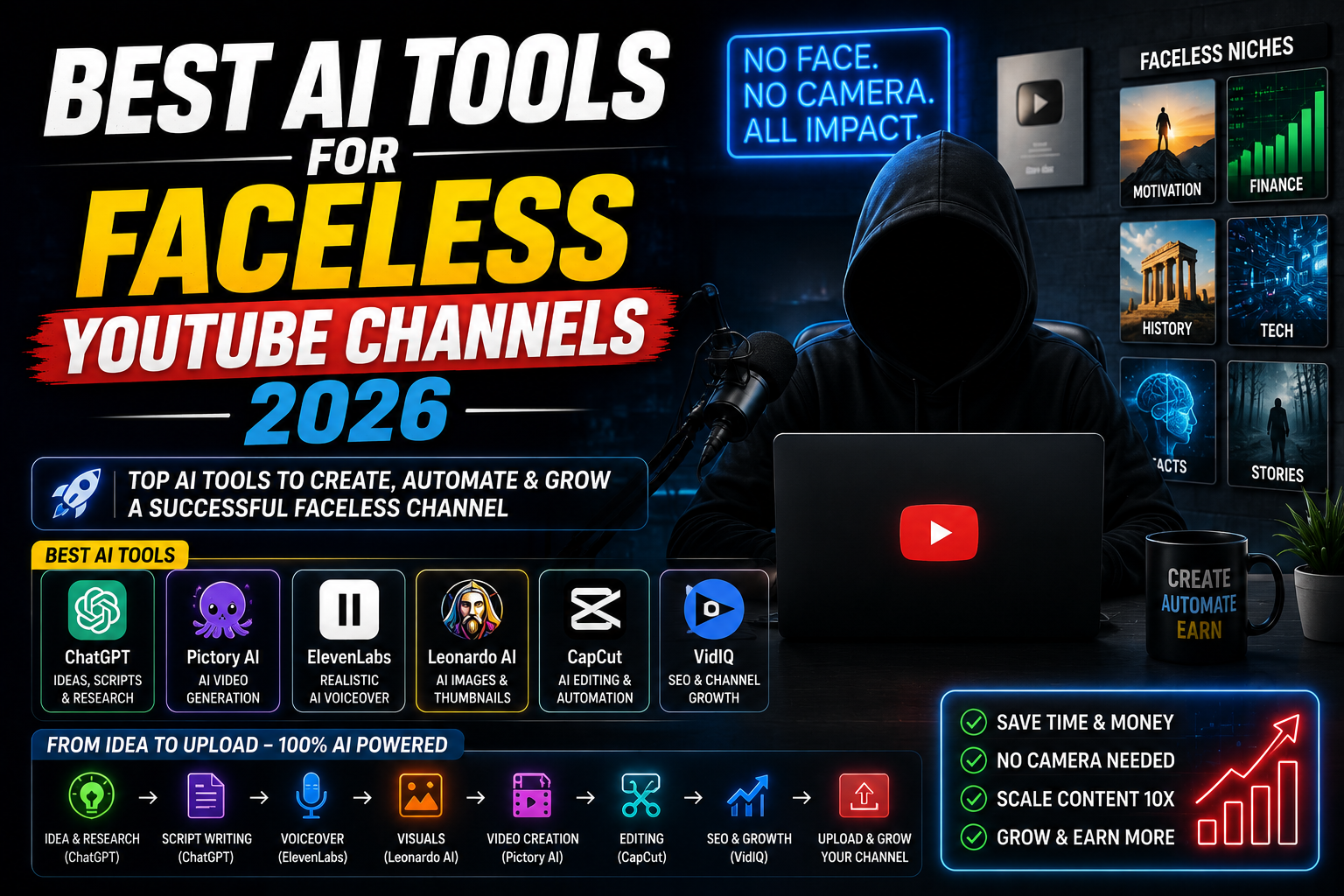
Before listing tools, it’s worth being clear about what you’re building. A faceless YouTube video has six distinct production phases, and AI now covers every single one:
You need at least one reliable tool for each stage. The goal is finding the combination that’s fast enough to publish consistently, cheap enough to be profitable, and good enough quality that viewers stay.
Script is more important than any other production element. A brilliant script with average production retains viewers. An average script with brilliant production doesn’t. Invest the most time and tool quality here first.
The Tools — Broken Down by Job
This is where my friend starts every video. He gives Claude a topic, the target audience, video length, and tone — and asks for a full script structured for YouTube retention: strong hook in the first 30 seconds, clear sections, natural spoken language, no bullet-point structure that sounds weird when read aloud. Claude handles the research synthesis and structure well. He then edits heavily to add his channel’s specific voice and any personal observations. The draft takes ten minutes. The editing takes an hour. That ratio — 10 minutes AI, 60 minutes human — is the right balance for scripts that don’t sound AI-generated.
If you want tools specifically tuned for YouTube content — with templates for different video formats like listicles, explainers, stories, or countdowns — Writesonic and Jasper both have YouTube-specific modes. They’re less flexible than Claude for custom structures but faster if your niche lends itself to standard video formats. Good for channels that produce high volume (3+ videos per week) where speed matters more than highly customized scripts.
For voiceover quality, ElevenLabs is the standard everything else is compared against. The voices have genuine intonation variation, natural pacing, and emotional range. The free tier gives you 10,000 characters per month — enough for two or three short videos before you need the paid plan. The voice cloning feature lets you create a consistent “channel voice” that sounds the same across every video, which matters for brand consistency. My friend uses a single ElevenLabs voice for every video and his audience has commented that they recognize it as his “narrator.” Nobody suspects it’s AI.
Both Murf and Play.ht offer larger free tier allowances than ElevenLabs. Murf has a built-in script-to-voiceover studio with background music mixing. Play.ht has excellent voice variety and slightly more generous free credits. The voice naturalness is a small step below ElevenLabs on direct comparison, but for most YouTube content — especially educational or documentary style where delivery is measured rather than highly expressive — both are completely adequate and significantly cheaper for high-volume production.
Invideo AI is the closest thing to a complete faceless video factory. You paste your script, choose a style, and it automatically selects stock footage clips, adds captions, syncs with your voiceover audio, and produces a rough cut. The automatic stock selection isn’t always perfect — you’ll replace maybe 30% of the clips manually — but getting to 70% automatically saves enormous time. The free plan watermarks exports; the paid plan ($20/month) removes watermarks and unlocks better stock libraries. For channels focused on news, history, health, finance, or any factual topic, this tool alone can handle most of the visual layer.
When stock footage doesn’t have what you need — abstract concepts, futuristic visuals, anything unusual — Runway and Pika generate short video clips from text descriptions. A 3–5 second AI-generated clip of something visually striking cuts in seamlessly between stock footage and adds production value that separates your channel from channels using only generic stock libraries. Neither tool is cheap for heavy use, but using a handful of generated clips per video is well within free tier limits for most channels.
“The channel that wins on YouTube is the one that publishes consistently. AI doesn’t make perfect videos — it makes publishable ones fast enough that you actually ship them.”
CapCut’s desktop version is free and handles auto-captions in multiple languages with high accuracy. For faceless YouTube, captions matter — they keep viewers engaged and improve accessibility and watch time. CapCut’s “Auto Captions” feature transcribes your voiceover and places styled captions automatically. You then edit timing, fix any errors, and style them. The whole process takes 20–30 minutes for a 10-minute video. CapCut also has an AI-powered “smart cut” feature that removes dead air and silences automatically, which is useful if your AI voiceover has unnatural pauses.
Background music for YouTube has always been a licensing headache. AI-generated music from Suno or Udio is copyright-free and you can generate exactly the mood you want — “calm corporate background, 3 minutes, no melody” or “mysterious documentary underscore.” The quality is genuinely usable for background use and generating 5–10 tracks takes about 20 minutes. My friend generates a fresh track for each video, which also means his music never sounds repetitive to regular viewers.
The thumbnail workflow that works best for faceless channels: generate the background image or main visual in Midjourney (or free alternatives like Leonardo.ai or Adobe Firefly), then bring it into Canva to add bold text, graphic elements, and brand consistency. This combination produces thumbnail quality that rivals channels with dedicated graphic designers. A Midjourney-generated dramatic scene with Canva’s text treatments on top consistently outperforms generic stock photo thumbnails in click-through rate.
Both TubeBuddy and VidIQ install as browser extensions and add keyword data, search volume estimates, and competitive analysis directly to YouTube’s interface. When you’re typing a title, they show you how competitive that keyword is and suggest variations with better search potential. The free tiers of both are genuinely useful — you don’t need the paid plans for a channel under 100K subscribers. VidIQ’s AI title generator takes your topic and produces 10 title options ranked by estimated click potential.
The Full Tool Stack at a Glance
How to Actually Start — First Video Workflow
Mistakes That Kill Faceless Channels
Raw AI script output is recognizable — it has a certain rhythm, overuses certain phrases (“Furthermore,” “It’s worth noting,” “In this video we will explore”), and lacks specific details that make content feel researched by a human. YouTube’s audience is increasingly good at detecting generic AI content and the algorithm tracks watch time — if viewers bail at the 2-minute mark consistently, your channel won’t grow. Edit every script until it sounds like a specific, knowledgeable person talking, not a generic summary.
There are certain stock footage clips — the spinning globe, the dollar bills falling, the person typing on a laptop — that appear in thousands of faceless videos. Viewers have seen them so many times they’ve become actively off-putting. Check your visuals before publishing. If you’ve seen that exact clip in other videos, replace it. Use Runway or Pika for unusual visuals, or use still images with subtle Ken Burns movement instead of bad stock footage.
Faceless channels work in every niche, but they work better when the creator has genuine knowledge of the subject. If you’re picking a niche purely based on monetization potential without any personal interest or expertise, the content will feel thin and generic — even with good AI tools — and won’t retain viewers against channels where the creator actually cares about the topic. Pick something you’d watch, not just something you’d monetize.
AI-generated voiceovers and images are generally fine for commercial YouTube use, but check each tool’s terms for commercial licensing specifically. AI-generated music from Suno and Udio — check their current terms, as policies on commercial YouTube use have evolved. Stock footage from free libraries like Pexels and Pixabay is safe. Invideo AI’s licensed stock is also safe for YouTube monetization. When in doubt, use AI-generated or Creative Commons Zero licensed assets.
What My Friend’s Channel Actually Does
His channel is in the personal finance niche — debt payoff strategies, budgeting approaches, investing basics for beginners in South Asia. He publishes two videos per week, each 8–12 minutes long. The full production time per video averages about 4 hours spread across two days.
His budget: ElevenLabs paid plan ($22/month), Invideo AI paid plan ($20/month), Midjourney ($10/month), VidIQ free tier. Total: $52/month. His current channel revenue from AdSense and affiliate links averages $800–1,200/month at 84K subscribers.
The most important thing he told me: the AI tools didn’t make the channel successful. Publishing 96 videos in 18 months made it successful. The AI tools just made it possible to publish 96 videos while working a full-time job.
Consistency beats quality on YouTube at the growth stage. A channel that publishes every week for a year will outperform a channel that published 5 perfect videos. AI tools don’t make perfect videos — they make good-enough videos fast enough that you can actually maintain a publishing schedule. That’s the actual value proposition.
Start with three tools, not twelve. Claude for script, ElevenLabs for voiceover, Invideo AI for visuals. Those three cover 80% of your production and cost under $50/month combined. Add CapCut (free) for captions and final editing. Add VidIQ (free tier) for SEO. That’s a complete faceless channel stack for under $50/month. Don’t try to build the perfect workflow before publishing your first video. The tools will change, your process will improve, and you’ll discover what your specific niche actually needs. The only thing that doesn’t change: you need to publish consistently, and AI is what makes that possible without quitting your day job.