The first time I tried to generate a portrait for a client’s campaign, the woman in the image had seven fingers on one hand and teeth that looked like they belonged to three different people. I spent two hours generating variations. Here’s what actually fixed it.
Anyone who uses AI image generators regularly has a folder of horrors. Hands that look like they went through a blender. Smiles with seventeen teeth. Eyes where one is looking forward and the other is quietly escaping the face. It’s the most consistent weakness in AI image generation and it’s been there since the beginning.
The good news is that it’s gotten significantly better in recent model versions — Midjourney v6, DALL-E 3, and Adobe Firefly all handle anatomy far more reliably than their predecessors. The bad news is that “more reliably” isn’t the same as “reliably.” You still get nightmare hands and uncanny faces regularly, especially when the prompt puts hands in focus or asks for close-up facial detail.
After two years of using these tools professionally, I’ve built up a set of specific prompt strategies that consistently produce better results. Not perfect — AI anatomy is still a work in progress — but meaningfully better than generic prompts.
Why AI Still Struggles With Hands and Faces
Understanding the problem helps you work around it. AI image generators learn by processing millions of training images. Faces are well-represented — there are billions of photographs of faces and the model has learned their structure well. But hands are notoriously difficult to photograph well, appear in inconsistent positions, and are often partially obscured or at unusual angles in training images.
The result: the model knows what a hand “should” look like in general but is uncertain about specific finger positions, proportions, and connections. When uncertain, it tends to generate something that statistically resembles a hand — which produces anatomical disasters that somehow still look vaguely hand-shaped.
Faces have a different problem. The model has learned faces so well that it sometimes over-interpolates — generating a face that’s statistically “perfect” in ways that trigger the uncanny valley. Eyes that are just slightly too symmetric. Skin that’s just slightly too smooth. A smile with too many uniformly perfect teeth.
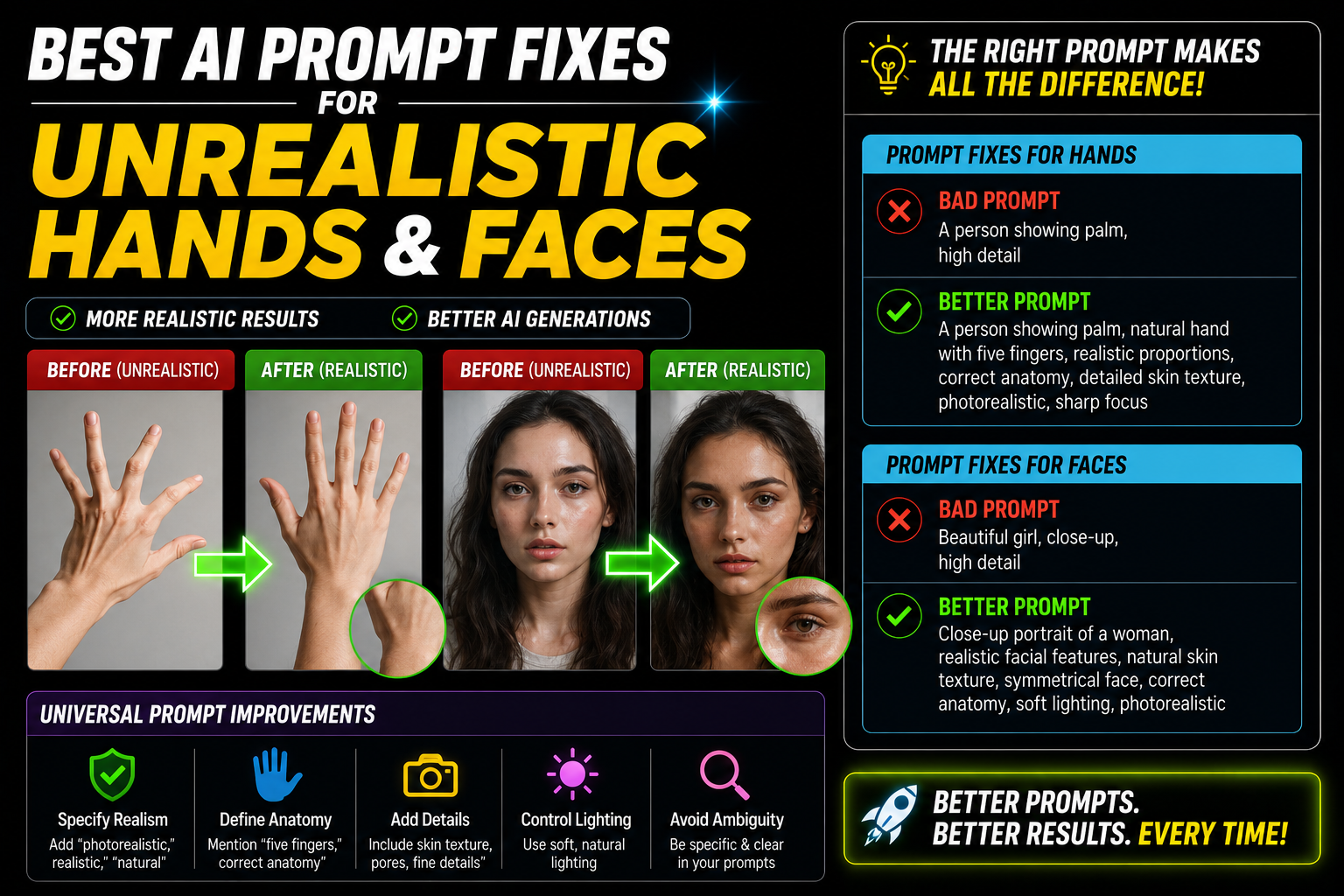
The fix for bad hands is usually to reduce their prominence in the image or describe their position very specifically. The fix for uncanny faces is usually to add imperfection descriptors and anchor the style to real photography rather than digital rendering. Both problems respond to specificity.
Fixing the Hand Problem
The simplest fix is also the most reliable: don’t show hands. Or show them partially. A portrait where the subject’s hands are behind their back, in their pockets, or just out of frame entirely sidesteps the problem completely.
When you genuinely need hands in the image, describe them with the precision of an anatomy textbook. Vague hand descriptions produce vague hand results. Specific position descriptions give the AI a much clearer target.
In Midjourney, negative prompts (–no) can specifically exclude the anatomy problems you’re trying to avoid. This doesn’t eliminate bad hands entirely but shifts the probability toward better outputs.
Adding a specific photography style anchor — “documentary photography,” “editorial magazine portrait,” “environmental portrait photography” — pulls the generation toward photographic realism and away from the uncanny stylized quality where hand problems are worst.
Fixing the Face Problem
Faces that look uncanny aren’t usually the result of wrong anatomy — it’s over-perfect anatomy. The AI generates faces where everything is too even, too smooth, too symmetrical. Adding specificity and imperfection to face descriptions consistently produces more human-looking results.
The instruction “smiling” produces the AI’s default idea of a smile — which is usually slightly too wide, teeth too even, and too symmetrically placed. Describing the expression in terms of what the person is feeling or doing produces more natural results.
Try: “woman laughing at something just off-camera, genuine candid expression, slight squint at the outer corners of eyes”
Or: “woman with a soft closed-mouth smile, relaxed expression, warm but not posed”
Or: “woman mid-conversation, natural expressive face, engaged expression”
“The AI generates what it thinks hands and faces should look like statistically. Your job is to give it enough specific information that it can aim for something real instead.”
Tool-Specific Fixes
Each major tool has slightly different techniques that work best for anatomy problems:
Midjourney v6 responds well to the negative prompt approach combined with lower stylize values. The v6 model is significantly better than v5 for hands — if you’re on v5, that alone might be the fix. Use –style raw to reduce the artistic processing that can distort anatomy.
DALL-E 3 follows literal descriptions most precisely — if you describe a hand position in enough detail, it will attempt to reproduce it accurately. The downside is that highly literal descriptions produce stiffer, less natural-looking results. Balance specificity with some natural movement language: “fingers naturally relaxed” rather than “fingers exactly parallel.”
Adobe Firefly has a “Reference Image” feature that’s excellent for face consistency — upload a reference photo of the type of face you want and it anchors the generation to that anatomy. For hands, Firefly’s Generative Fill in Photoshop lets you paint over problem hands and regenerate just that area with a specific prompt, which is the most controlled approach of any tool for fixing specific anatomical problems.
Generate your image without hands in frame. Then use Adobe Firefly’s Generative Fill to paint over where the hands should be and generate them separately with a targeted hand-specific prompt. This two-step approach produces better hand results than any single-prompt approach because you can iterate the hands independently without regenerating the entire image.
Step-by-Step: When You Get a Bad Hand or Face
Mistakes That Make Anatomy Worse
High stylize values in Midjourney (400+) prioritize artistic quality over accuracy. For landscapes and abstract images this is fine. For portraits where you need correct anatomy, high stylize pushes the AI toward stylized interpretation rather than realistic rendering — which often makes hands and faces worse. Keep stylize between 75–200 for portrait work that requires anatomical accuracy.
Words like “perfect smile,” “flawless skin,” “beautiful hands,” and “ideal proportions” push the AI toward its internal idea of perfection — which produces the uncanny valley aesthetic. Real people aren’t perfect. Prompts that acknowledge natural imperfection produce faces that look human because they’re not trying to optimize away the small variations that make faces recognizable and relatable.
“Person holding a phone” without any additional hand description almost always produces bad hands. The more prominently hands feature in the composition, the more specific your description needs to be. If hands are a visual focal point, treat the hand description with the same detail you’d give the face description.
If you’re getting consistently terrible anatomy results, the first thing to check is whether you’re on the latest model version. Midjourney v6 vs v5 is a massive difference for hands. DALL-E 3 vs DALL-E 2 is similarly significant. Some anatomy problems that required complex prompt workarounds in older versions simply don’t appear in current versions. Upgrade the model before investing heavily in prompt workarounds.
What Finally Fixed the Client Campaign Images
Going back to that seven-fingered woman from the beginning — the campaign eventually used a portrait with her hands out of frame entirely, and a separate hand-focused image generated with a detailed position description and then inpainted in Photoshop to fix one finger. The client was happy. Nobody noticed the composite approach.
What I learned: trying to get one perfect AI-generated image with perfect hands and a perfect face in a single generation is often the wrong goal. The faster, more reliable workflow is generating an excellent face/composition first, then fixing specific anatomy problems separately — either through inpainting or manual Photoshop correction.
That shift in expectation — from “generate perfect” to “generate good and fix specific problems” — is the mental model that makes AI image generation for professional work actually viable.
For hands: hide them when you can, describe position anatomically when you can’t, and use negative prompts to exclude the specific problem you’re seeing. For faces: add imperfection language, specify the expression as an emotion or moment rather than a face configuration, and avoid “perfect” or “flawless” descriptors. For both: use a lower stylize value, anchor to documentary or editorial photography style, and use Firefly’s Generative Fill or Photoshop inpainting to fix problem areas rather than regenerating the entire image. The goal isn’t a perfect generation — it’s the fastest path to a usable result.